Close Menu
  • Home
  • Entertainment
  • National
  • International
  • Tech
  • Politics
  • Sports
  • PMNI
  • More
    • Business
    • Culture
    • Education
    • History
    • Health
  • Featured
    • Fishe Travel
    • Fishe Media
    • Fishe TV
Facebook X (Twitter) Instagram
FISHE NEWS
  • Home
  • Entertainment
  • National
  • International
  • Tech
  • Politics
  • Sports
  • PMNI
  • More
    • Business
    • Culture
    • Education
    • History
    • Health
  • Featured
    • Fishe Travel
    • Fishe Media
    • Fishe TV
Facebook X (Twitter) Instagram
FISHE NEWS
Home»Technology»WhatsApp Chat Lock Feature, How To Use It
Technology

WhatsApp Chat Lock Feature, How To Use It

FisheBy FisheJune 28, 2023No Comments2 Mins Read
Facebook Twitter Pinterest LinkedIn Tumblr Email
Share
Facebook Twitter LinkedIn Pinterest Email

This should kick for those whose phone are not really mobile as the case maybe, and wants to secure their chats in WhatsApp. Though WhatsApp offers end-to-end encryption to keep it secure digitally, it is also important to keep things secure and private from users’ end.

To ensure the aforementioned, WhatsApp added the “app lock feature” to the platform that allows users to lock the entire app, and prevent it from getting accessed by unauthorised person.

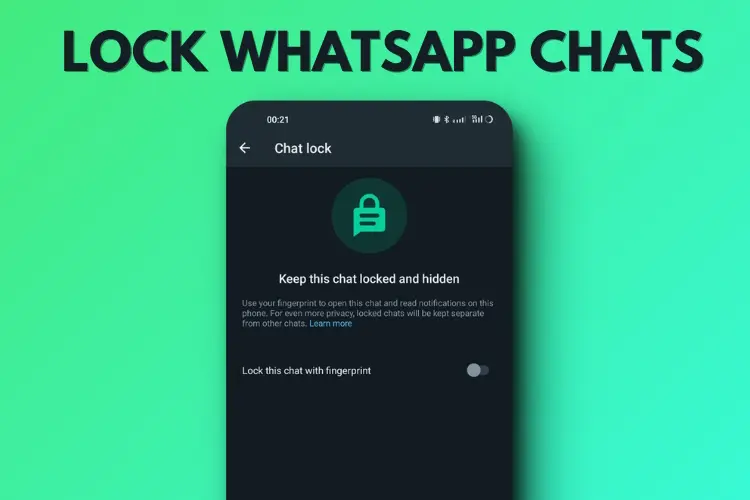
The Meta owned instant messaging app has rolled out a new Chat Lock feature that allows users to lock individual chats and group chats for added privacy and security purposes.

To use this feature and lock individual chats on WhatsApp, follow our step-by-step guide:



Things you need to know about WhatsApp Chat Lock

  • Locks individual chats and group chats
  • Hides the contact or group from the regular Chat listing on the app
  • Hides message preview from notification panel
  • Moves locked chats to dedicated Locked Chat section
  • Lock chats with biometric, PIN or password

Pre-requisites

Make sure you’ve installed the latest version of the WhatsApp app on your phone
Active WhatsApp account

Steps to lock individual chats on WhatsApp

  • Open the updated WhatsApp on your phone
  • Scroll down the chat list or search the contact who’s chat you want to lock individually
  • Open the chat window of the contact and tap on the name at the top
  • Scroll down and tap on Lock chat option
  • Enable the toggle and authenticate using your screen lock
  • Note that WhatsApp automatically takes the phone’s lock screen method to lock the chats.

That’s it! That particular chat is now locked on WhatsApp. Repeat the same for other chats that you want to lock.

How to access locked chats on WhatsApp

All the locked chats on WhatsApp move under a new tab called Locked Chats. Simply swipe down from the top on the chat list screen to access the Locked Chat option. Tap on it, authenticate it and there you are. All your locked chats will be available.

Share. Facebook Twitter Pinterest LinkedIn Tumblr Email
Fishe
  • Website
  • Facebook
  • X (Twitter)
  • Instagram
  • LinkedIn

We leverage creative and strategic design to amplify our clients’ products and services, capturing audience attention and transforming brand perception into real-world engagement. As a client-first B2B company, our experts are proactive, flexible, and responsive—delivering exactly what our clients need, when they need it, and before competitors do.

Related Posts

Nigeria’s Data Needs To Return Home. But Is Our Infrastructure Up To The Task?

October 4, 2026

Fostering The Future Together: Advancing Global Technology And Education Partnerships For Children

September 22, 2026

MTN Has 100 Million Subscribers. The Interesting Part Is What Happens Next

September 16, 2026

Comments are closed.

Here is spotlighting many benefits of journeying with either Lagos State’s Blueline or Redline rails for a hassle-free day, week, month and year. Thank God for the Igbega Eko. Together we rise.
https://youtu.be/V67GV8wgyjw

Latest Posts

  • BREAKING IN THE NEWS: Several Feared Dead As Helicopter Crashes In Igbokoda, Ondo State
  • 100 Days To Nigeria’s 2027 Election: The Ballot, The Battle And The Burden
  • Nigeria’s Data Needs To Return Home. But Is Our Infrastructure Up To The Task?
  • Nigeria Begins Local Production Of Next-Generation Malaria Nets As Harvestfield Opens New Front In Health Manufacturing
  • From Appropriation To Impact: What The 2025 Budget Extension Means For Citizens

LATEST POSTS

BREAKING IN THE NEWS: Several Feared Dead As Helicopter Crashes In Igbokoda, Ondo State

October 5, 2026

100 Days To Nigeria’s 2027 Election: The Ballot, The Battle And The Burden

October 5, 2026

Nigeria’s Data Needs To Return Home. But Is Our Infrastructure Up To The Task?

October 4, 2026

Nigeria Begins Local Production Of Next-Generation Malaria Nets As Harvestfield Opens New Front In Health Manufacturing

October 2, 2026

From Appropriation To Impact: What The 2025 Budget Extension Means For Citizens

October 1, 2026

Subscribe to Updates

Get the latest news from FISHE about politics, economy, health and business, etc

Facebook X (Twitter) Instagram Pinterest
© 2026 ThemeSphere. Designed by ThemeSphere.

Type above and press Enter to search. Press Esc to cancel.